Why Toonypop Is the Smart Choice for Playful, Readable Design
In the crowded world of digital typography, finding a font that balances personality with professionalism is often harder than it looks. Many designers reach for bold, cartoon-style typefaces only to discover they are too messy, illegible at small sizes, or simply dated in their execution. This is where Toonypop stands out as a practical solution. It is not just another decorative comic font; it is a carefully crafted tool designed to bring energy to your projects without sacrificing clarity. Whether you are creating educational materials, designing product packaging, or building a brand identity for a family-oriented business, understanding how to leverage this specific typeface can significantly elevate your work.
The Balance Between Fun and Function
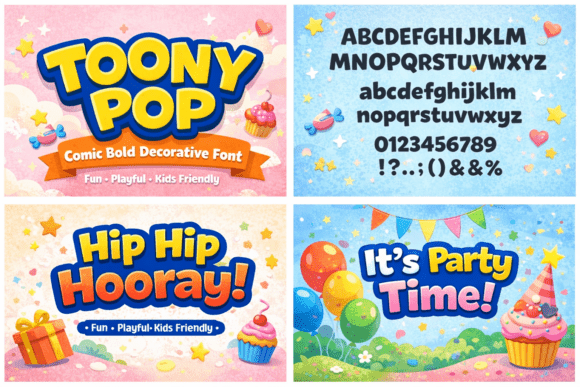
The primary appeal of Toonypop lies in its unique ability to merge playful aesthetics with structural integrity. Unlike many "cartoon" fonts that rely on erratic strokes and inconsistent widths to achieve a whimsical look, Toonypop features rounded letterforms with clean, consistent shapes. This design philosophy ensures that the font remains expressive and friendly while maintaining high readability even at display sizes.
When evaluating a new typeface, it is easy to get distracted by the initial visual impact and overlook how the letters interact in long strings of text. A common mistake creators make is choosing a font that looks great in a single word but becomes chaotic when used in a sentence or paragraph. Toonypop avoids this pitfall through its balanced design. The medium-bold weight provides enough presence to grab attention on posters and stickers, yet the open counters and clear distinction between characters prevent the text from becoming an unreadable blob. This makes it an ideal choice for content creators who need to communicate messages quickly and effectively to children, families, or entertainment audiences.
Avoiding the Trap of Over-Decoration
One of the most frequent errors in graphic design involving playful fonts is over-decoration. Designers often feel compelled to add extra flourishes, drop shadows, or 3D effects to a font like Toonypop to make it "pop." However, because Toonypop already possesses a strong, self-contained character, adding excessive styling can actually degrade its quality. The font's inherent friendliness comes from its simplicity and rounded edges; cluttering these elements can make the design look amateurish and reduce legibility.
Consider a scenario where a marketer is designing a flyer for a children's event. If they apply a heavy outer glow or a complex texture to the Toonypop text, the message may become difficult to read from a distance. Instead, the better approach is to let the font breathe. Use ample white space around the text and pair it with solid, contrasting background colors. By trusting the font's built-in design, you ensure that the communication remains crisp and professional, even within a fun context.
Common Pitfalls in Font Selection and Application
Before integrating any new typeface into your workflow, it is crucial to understand the potential pitfalls that can affect your project's success. With Toonypop, the main risks involve mismatched usage contexts and ignoring licensing constraints. While the font includes uppercase and lowercase letters, numbers, and common punctuation marks, making it versatile for various applications, it is not a one-size-fits-all solution for every project.
Mistake 1: Using Display Fonts for Body Text
Although Toonypop is highly readable, it is primarily designed for display purposes—headlines, titles, logos, and short phrases. Using it for large blocks of body text in an ebook or a long-form blog post can cause reader fatigue. The rounded, bold nature of the letters demands more cognitive effort to process over long distances compared to standard serif or sans-serif typefaces. To avoid this, reserve Toonypop for headlines and use a neutral, clean sans-serif font for the main body copy. This pairing creates a harmonious hierarchy that guides the reader's eye naturally.
Mistake 2: Ignoring Color Contrast
Another overlooked detail is color selection. Because Toonypop has a friendly, soft appearance, placing it against a similarly soft or low-contrast background can render the text invisible. For example, using light blue Toonypop text on a pale yellow background might look aesthetically pleasing initially but will fail accessibility standards and frustrate readers. Always test your font choices with high-contrast combinations, such as dark navy on white or bright orange on black, to ensure the message is accessible to everyone.
Evaluating Versatility Before You Buy
When considering purchasing or downloading a font like Toonypop, it is essential to evaluate its versatility against your specific project needs. Many beginners download a font based on a single sample image, only to find later that it lacks the necessary glyphs for their language or specific design requirements. Toonypop addresses this by offering a comprehensive character set, including numbers and punctuation, which is vital for branding and packaging where dates, prices, and slogans are required.
However, you should still verify the license terms before committing. Are you allowed to use it for commercial merchandise? Can you embed it in web documents? Understanding these restrictions prevents costly legal issues down the line. For entrepreneurs and small business owners, the cost of a font is negligible compared to the cost of rebranding due to a licensing violation. Take the time to read the End User License Agreement (EULA) thoroughly. If the font is intended for a specific niche, such as educational materials, ensure the license permits distribution in printed handouts or digital classrooms.
Strategic Implementation for Maximum Impact
To truly harness the power of Toonypop, you must align its application with your audience's expectations. This font resonates deeply with demographics looking for approachability and joy. Educators, illustrators, and brands targeting families will find that Toonypop instantly communicates a welcoming tone. However, this tone must be consistent across all touchpoints. If you use Toonypop for your logo but switch to a rigid, corporate font for your website headers, you create a disjointed brand experience that confuses the consumer.
Practical advice for implementation involves testing the font in real-world scenarios before finalizing a design. Print a mock-up of your poster or packaging to see how the ink interacts with the paper. Sometimes, what looks sharp on a screen can appear muddy when printed, especially with bold weights. Additionally, consider the medium. On mobile screens, the rounded forms of Toonypop render beautifully, but ensure the font size is large enough to remain legible on smaller devices. A responsive design strategy that adjusts font sizing based on screen width will maintain the font's integrity across all platforms.
Ultimately, the decision to use Toonypop should be driven by a desire for clarity and connection. It offers a rare combination of expressive character and functional reliability. By avoiding common mistakes like over-styling, misusing it for body text, or neglecting contrast, you can create designs that are not only visually appealing but also effective in conveying your message. Whether you are a freelancer crafting a sticker pack or a marketing team launching a new family product, Toonypop provides the foundation for creative, high-quality work that stands the test of time.